NetLens WiFi Heatmap for Mac?

Looking for a NetLens WiFi Heatmap alternative on Mac?

This page refers specifically to NetLens: Wifi Heatmap Survey by DopamineFixx, the Android Wi-Fi survey app at netlens.fyi. Other unrelated products also use the NetLens name on Apple platforms. WiFi Lens takes a different approach: it turns your Mac into a native Wi-Fi analysis and diagnostics workstation.

macOS 14+ · Native · Local-first · Open-source edition available

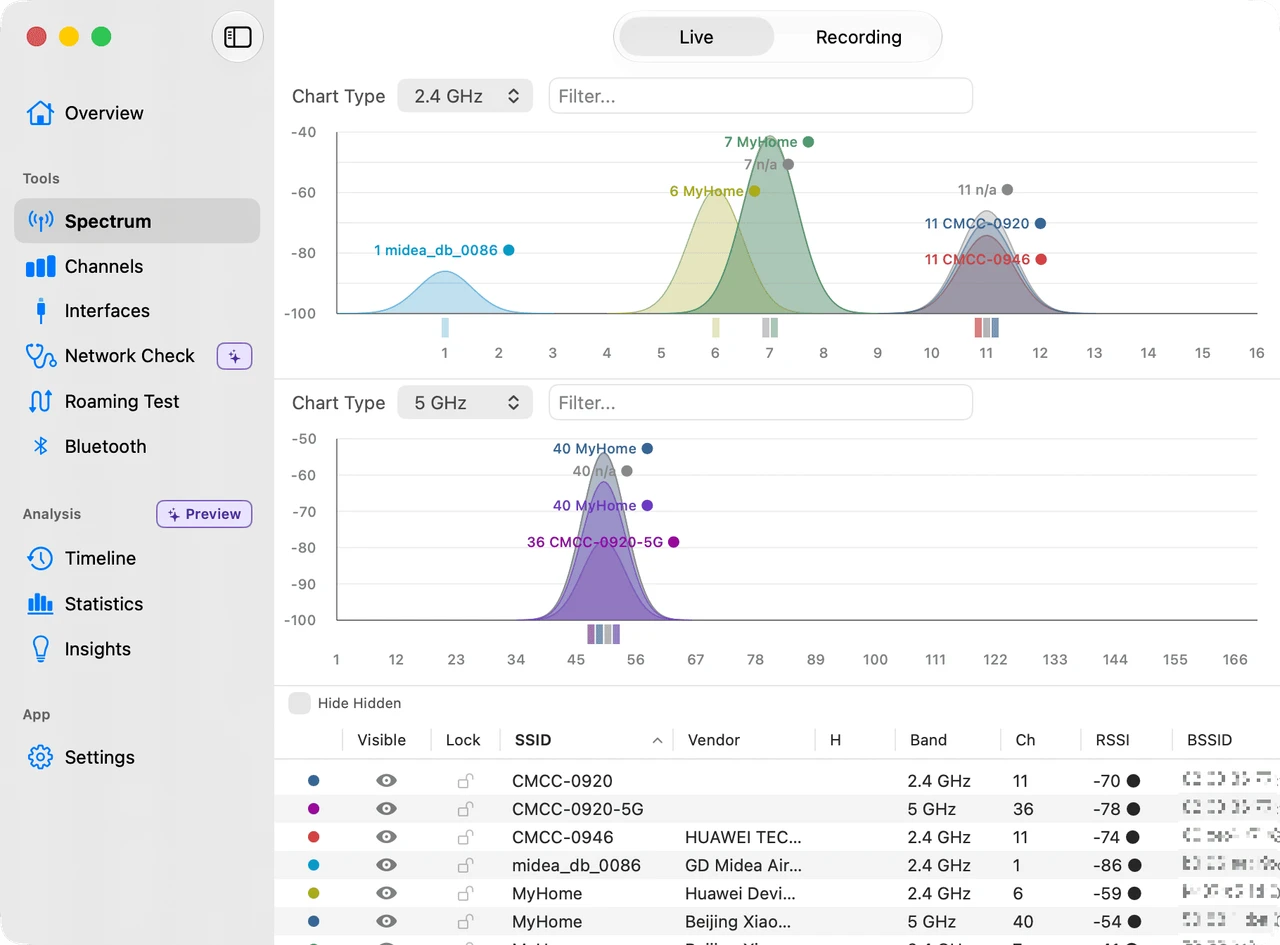
WiFi Lens spectrum scanner showing nearby Wi-Fi networks and channel congestion on macOS
The short answer

The specific NetLens: Wifi Heatmap Survey compared on this page lists Android 13+ as its platform as of August 2026. Other apps named NetLens do exist on Apple platforms. If your goal is Wi-Fi analysis and troubleshooting from a Mac, WiFi Lens is built natively for macOS 14+.

Same problem, different workflow

Choose by what you are trying to learn

Both tools make Wi-Fi easier to see, but they are optimized for different jobs.

Android NetLens: Wifi Heatmap Survey

Map coverage while walking

Best when you want to move through a room, home, office, or warehouse and turn signal samples into a spatial coverage map.

  • AR walking heatmaps
  • Floor-plan survey workflow
  • PDF, PNG, and CSV survey exports
Visit the NetLens WiFi Heatmap website ↗
macOS WiFi Lens

Diagnose the network from your Mac

Best when you want to understand channel congestion, connection health, network failures, or roaming behavior from the Mac you are actually using.

  • 2.4 / 5 / 6 GHz spectrum and channel analysis
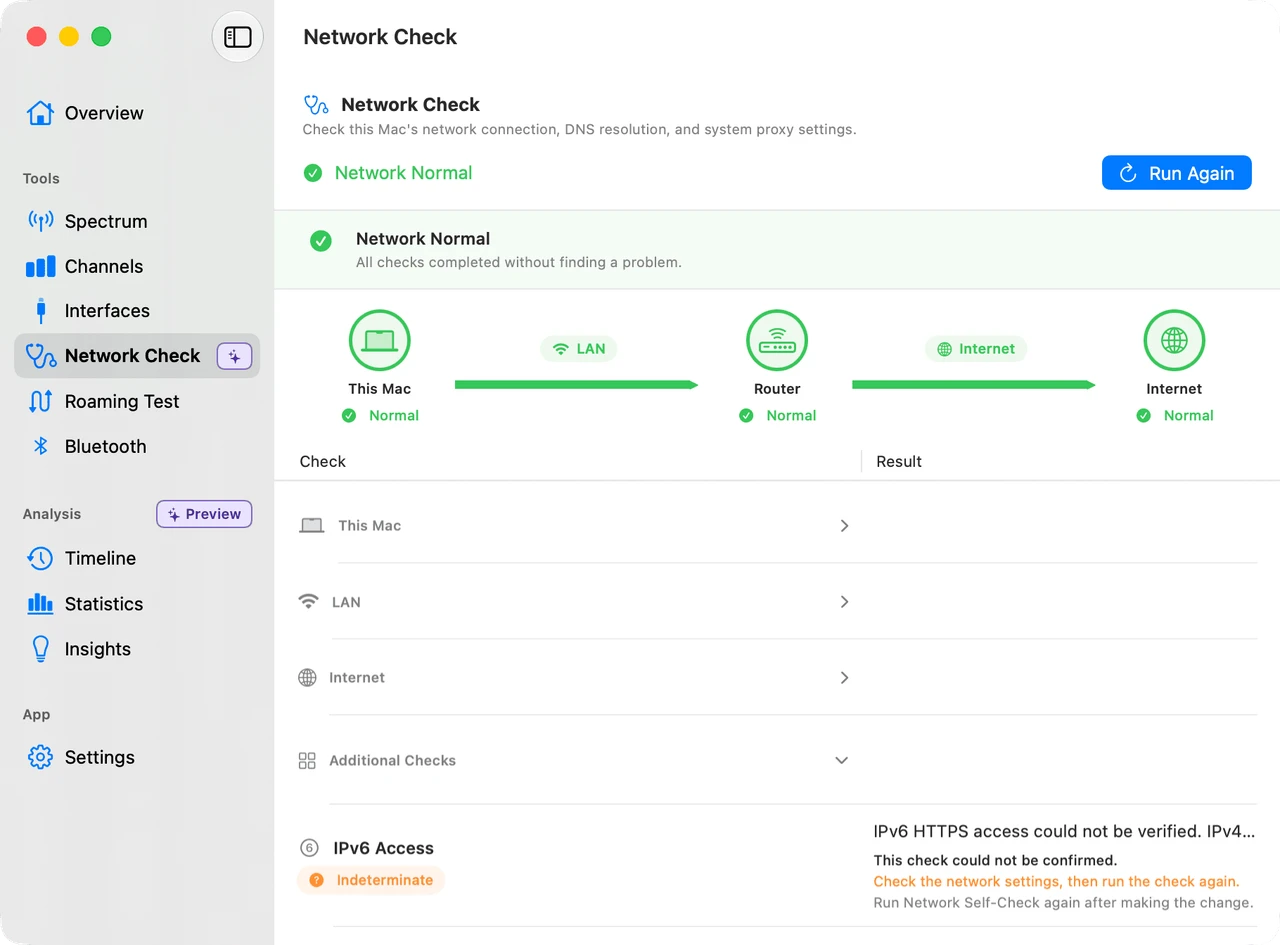
  • Connection, LAN, DNS, proxy, VPN, and Internet self-checks
  • Roaming tests, Timeline history, Statistics, and Insights
Explore WiFi Lens features →
Built for desktop troubleshooting

From “the Wi-Fi feels bad” to a concrete next step

Start with the connection you are using, inspect nearby networks and channel pressure, then run staged diagnostics when the problem is not purely wireless. WiFi Lens keeps those views in one native macOS app instead of treating Wi-Fi as a single signal-strength number.

01 · See Scan nearby networks and compare spectrum activity across all major Wi-Fi bands.
02 · Diagnose Check this Mac, LAN, DNS, proxy/VPN routing, gateway reachability, and Internet connectivity.
03 · Verify Walk with your Mac to validate AP handoffs and review signal or connection events over time.
WiFi Lens Network Self-Check showing staged diagnostics for this Mac, LAN, and Internet
Quick comparison

NetLens WiFi Heatmap vs. WiFi Lens

This comparison is specifically about NetLens: Wifi Heatmap Survey by DopamineFixx. It is not a comparison with every product that happens to use the NetLens name.

Need NetLens: Wifi Heatmap Survey WiFi Lens
Platform Android 13+ macOS 14+
Primary workflow Walk-and-map coverage survey Desktop Wi-Fi analysis and diagnostics
AR / floor-plan heatmaps Yes Not the focus
Channel visibility Channel graph and AP browser Tri-band spectrum, channel scoring, and recommendations
Network troubleshooting Connection and live network tools Connection dashboard plus staged local/LAN/Internet self-checks
Roaming analysis Signal meter while moving Dedicated roaming tests with saved sessions and history
Local-first use Survey data stored on device No account, cloud sync, analytics, or telemetry

Which NetLens? This page refers only to NetLens: Wifi Heatmap Survey by DopamineFixx at netlens.fyi / Google Play. Its official site lists Android 13+ as of August 2026. Other unrelated products use the NetLens name, including apps available on Apple platforms. NetLens: Wifi Heatmap Survey is independent and is not affiliated with WiFi Lens or Shiina Labs. Product capabilities can change.

Which one should you use?
Choose NetLens WiFi Heatmap if…

You need a spatial Wi-Fi heatmap.

If the question is “where exactly is coverage weak in this building?”, a phone-based survey and floor-plan workflow is the more natural tool.

Choose WiFi Lens if…

You need to understand what your Mac is experiencing.

If the question is “why is this connection slow, crowded, unstable, or roaming badly?”, WiFi Lens gives you the desktop diagnostics to investigate it directly.

Download for macOS
FAQ

NetLens WiFi Heatmap and WiFi Lens on Mac

Is NetLens: Wifi Heatmap Survey available for Mac?
As of August 2026, the NetLens: Wifi Heatmap Survey app by DopamineFixx is listed for Android 13+ on its official website and Google Play. Other unrelated apps also use the NetLens name on Apple platforms. This page compares WiFi Lens only with the Android Wi-Fi heatmap product at netlens.fyi.
Is WiFi Lens a direct replacement for NetLens: Wifi Heatmap Survey?
Not feature-for-feature. NetLens: Wifi Heatmap Survey is designed around mobile Wi-Fi coverage surveys, including AR and floor-plan heatmaps. WiFi Lens is designed around desktop Wi-Fi analysis and troubleshooting on macOS. The overlap is Wi-Fi visibility; the workflow is different.
Can WiFi Lens create a floor-plan heatmap?
No. If a floor-plan or AR coverage heatmap is the main thing you need, NetLens: Wifi Heatmap Survey is the better fit. WiFi Lens instead focuses on nearby networks, spectrum and channel congestion, connection self-checks, roaming tests, and local history.
Does WiFi Lens work without an account or cloud service?
Yes. WiFi Lens is local-first: scanning and diagnostics run on your Mac without an account, cloud sync, analytics, or telemetry.