WiFi Explorer on a Mac?

Looking for a WiFi Explorer alternative on Mac?

WiFi Explorer is a mature Mac Wi-Fi scanner and analyzer for discovering nearby networks and inspecting their configuration and capabilities. WiFi Lens is not a copy of it: it combines Wi-Fi visibility with connection diagnostics, roaming tests, and historical network events in a native macOS workflow.

macOS 14+ · Native · Local-first · Open-source edition available

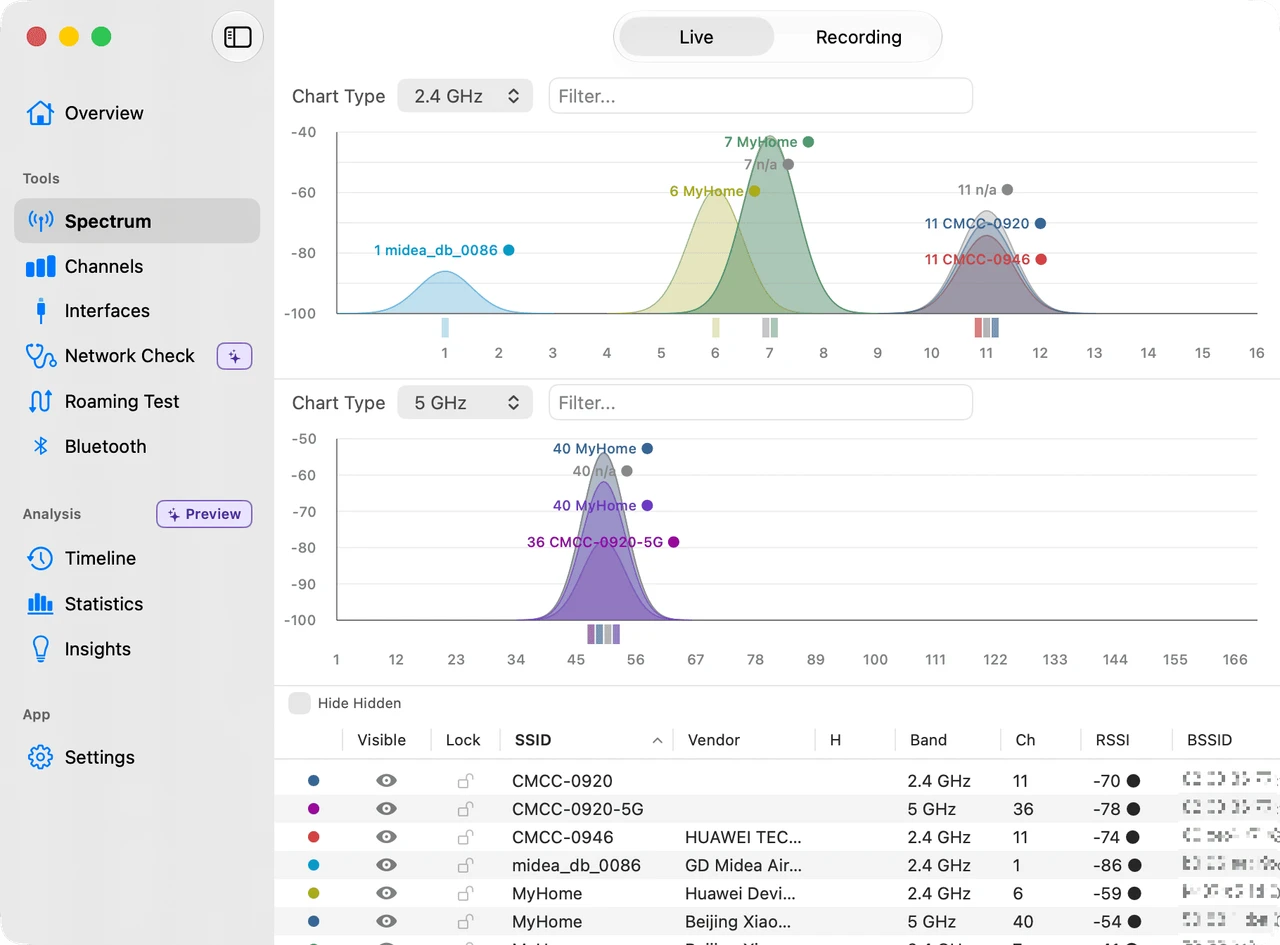
WiFi Lens spectrum scanner showing nearby Wi-Fi networks and channel congestion on macOS
The short answer

Choose WiFi Explorer if detailed Wi-Fi network capability inspection is your priority. Choose WiFi Lens if you want Wi-Fi analysis together with diagnostics for the Mac, LAN, DNS, proxy/VPN, Internet connectivity, roaming, and historical network events.

Analyzer vs. analyzer

Two Mac Wi-Fi tools, two different workflows

The overlap is real, but each product is designed to answer a different next question.

macOS 13.5+ WiFi Explorer

Inspect the wireless environment in depth

WiFi Explorer uses your Mac’s built-in Wi-Fi adapter to discover nearby networks and present their configuration and capability information.

  • Nearby Wi-Fi discovery
  • Network configuration and capability details
  • Filtering and visibility into channel conflicts
Visit the WiFi Explorer website ↗
macOS 14+ WiFi Lens

Diagnose what your Mac is actually experiencing

WiFi Lens connects spectrum analysis to the rest of the path between your Mac and the Internet, then keeps the evidence for recurring problems.

  • 2.4 / 5 / 6 GHz spectrum and channel scoring
  • Connection, LAN, DNS, proxy/VPN, and Internet checks
  • Roaming tests, Timeline, Statistics, and Insights in Pro
Explore WiFi Lens features →
Quick comparison

WiFi Explorer vs. WiFi Lens

A workflow comparison, not a scorecard. The table only states what each product’s official information supports.

NeedWiFi ExplorerWiFi Lens
Native macOS appYesYes
Nearby Wi-Fi discoveryYesYes
Channel visibilityYesYes
Detailed Wi-Fi capability inspectionStrong focusAvailable, not the primary focus
Channel recommendationsNot a stated focusYes
Connection diagnosticsAdvanced troubleshooting and diagnosticsYes
LAN / DNS / proxy / VPN diagnosticsNot a stated focusYes
Roaming testNot a stated focusYes
Historical informationNot a stated focusTimeline / Statistics / Insights in Pro
Open-source editionNot stated on the official product pageYes, OSS edition

About this comparison. WiFi Explorer capabilities were checked against Intuitibits’ official product information on 2026-09-26. WiFi Explorer is independent and is not affiliated with WiFi Lens or Shiina Labs. Product capabilities and pricing can change.

Which one should you use?
Choose WiFi Explorer if…

You want a mature discovery tool.

You primarily want detailed nearby-network configuration and capability inspection, with filtering and a focused view of the wireless environment.

Choose WiFi Lens if…

You need to investigate the whole connection.

You want to move from “the Wi-Fi looks wrong” into channel analysis, connection diagnostics, roaming validation, and historical investigation.

Get WiFi Lens Pro
FAQ

WiFi Explorer and WiFi Lens on Mac

Is WiFi Lens a replacement for WiFi Explorer?
Not feature-for-feature. WiFi Explorer is a mature Mac Wi-Fi discovery and troubleshooting tool with a strong focus on nearby network configuration and capability information. WiFi Lens combines Wi-Fi analysis with Mac, LAN, DNS, proxy/VPN, Internet, roaming, and historical diagnostics.
Is there a free WiFi Explorer alternative for Mac?
WiFi Lens has an open-source edition available on GitHub, as well as WiFi Lens Pro on the Mac App Store. It is a different workflow from WiFi Explorer and does not claim to reproduce every feature.
Is there an open-source WiFi Explorer alternative?
WiFi Lens OSS is an open-source macOS Wi-Fi analysis and diagnostics edition. It covers spectrum visibility, channel analysis, connection checks, and local troubleshooting; WiFi Explorer remains a separate proprietary product.
Does WiFi Lens scan nearby Wi-Fi networks?
Yes. WiFi Lens shows nearby Wi-Fi networks across the 2.4, 5, and 6 GHz bands, with channel congestion, scoring, and recommendations as part of its Mac analysis workflow.
Which is better for troubleshooting a Mac Wi-Fi connection?
Choose WiFi Explorer when detailed nearby-network capability inspection is your priority. Choose WiFi Lens when you also need connection self-checks, LAN/DNS/proxy/VPN/Internet diagnostics, roaming tests, and historical investigation on the Mac.